Oil Pressure Protection
Oil Pressure protection uses the data collected from a oil pressure sensor and/or oil temperature sensor to shut down the engine (in the case of sudden pressure drop) or limit the engines RPM (in case of a temperature range deviation) should conditions require it.
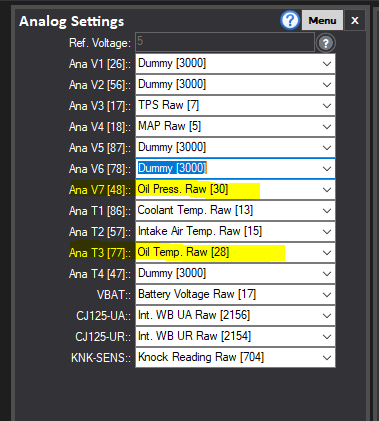
First, connect your Oil Temperature signal to an Analog T input, and the Oil Pressure Signal to Analog V input. The Pressure sensor will also likely require a 5V REF and Signal Ground connection to function. Then, set your Analog Settings (under IO Setup Tab) accordingly to the Oil Temp RAW and Oil Pressure RAW channels, as shown highlighted below:
Next, you will need to calibrate the Oil Pressure and Oil Temperature HRTs (under HRTs in the tree view) to match your sensors data: Confirm they are reading correctly by opening the Oil Pressure and Oil temperature readouts under the "Inputs" section of the Tree View. Some typical values shown below, but it will be sensor dependant. Check oil pressure works as you rev the engine and temperature also responds as expected. See the calibrating sensors section for more information.

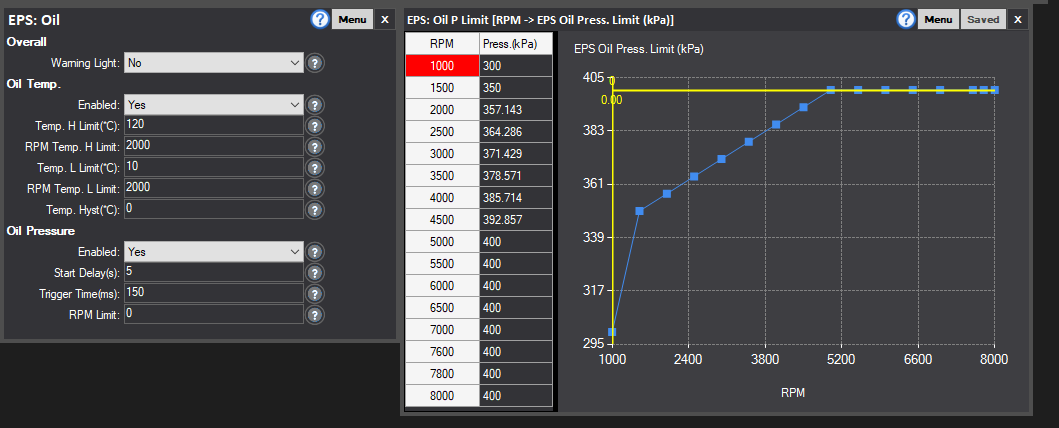
Finally, with all sensors calibrated and working correctly, you can now monitor what oil pressure your engine operates at when warm, and fill out the EPS: Oil Limit table to what the minimum oil pressure should be for various engine speeds. Normally idle oil pressure will be lower than higher RPM oil pressure etc. Then enable EPS: Oil protection. The "?" on each line of the driver contains more information as to each settings function. The below is a typical setup from a race-car we used for testing - though your engine may have different requirements.