LTT Usage Example
This is the place to be if you already know what LTT is, how it works and just want to learn how to use it on the ME ECU for auto-tuning.
Note that the LTT table doesn't update "live" in MEITE - you drive the car, and then when reconnecting to MEITE (after a power cycle) the table will be shown in MEITE with the latest data.
● Ensure that all the sensors (MAP, IAT, CLT, RPM, O2 etc) are reading and functioning correctly and acceleration enrichment is disabled (set the AE Threshold to a very high number). If any of them don't display the correct values, please check the HRTs, wiring or the sensor itself.
● Correctly populate your Target AFR table with the appropriate values for your engine. If you're not sure what they are, please contact a tuner, as continuing the process without a proper understanding of these notions will damage your engine.
● Re-check your “Lambda Settings”. Make sure that the conditions for using the sensor readings are correct (minimum coolant temperature, RPM, TPS, MAP etc) and that the LTT-related configuration parameters are correctly set.
● Ensure that the input axes for tables ‘Lambda LTT Trim Table’ , ‘Lambda LTT Confidence Table’ and ‘Base VE Table’ have the same values stored.
● Reset the ‘Lambda LTT Trim Table’ cells to 1 and the ‘Lambda LTT Confidence Table’ cells to 0. You can do this by selecting all the cells in the table, pressing backspace and entering the desired value there.
● Drive/dyno your car. Transients are bad for data collection, so try to keep RPM and load steady for a few seconds until moving on to the next area of the map. The changes to the Lambda LTT tables are not shown in real-time, so do not expect the table to be modified in the MEITE as you drive, also, note that the last two minutes of engine running are never stored - so we advise at least 10-20 minutes of driving under various loads and speed - the more the better, though once you have confidence numbers of 50+ for the mainly used areas of the map, this is usually enough.
● Cycle the ignition, and with the ignition on, but the engine off (not started), it’s time to check the results! Re-Connect using the MEITE, and then when loading the Lambda LTT tables, the trims and confidence values should be nicely distributed along the map, with high confidence values for all the ‘heavily driven’ cells.
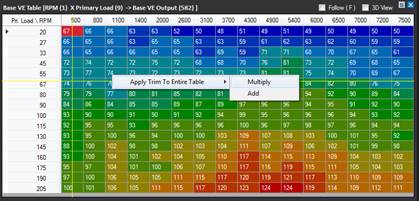
● You can either apply the long term trims to your VE Table to improve your map or leave them untouched in the Lambda LTT table. Do bare in mind that firmware updates erase all tables though, so always apply your trims, and save your calibration before doing a FW update. In order to apply your long-term-trims, right-click on the Base VE Table and select ‘Multiply’ from the ‘Apply Trim to Entire Table’ menu.
● The wizard pops up with the following components (Fig. 3):
○ ‘Trim Table’ - selects which table is to be used as the trim source. Set it to ‘Lambda LTT Trim’ for this.
○ ‘Confidence Table’ - set to ‘Lambda LTT Conf.’
○ ‘Min Confidence. Level’ - This stipulates the minimum level of confidence required to tune that cell - in other words, if the LTT module has only visited that cell a small number of times, we may not want to use it to tune the VE table. Set this to a reasonable number: 5 is a good starting point.
○ ‘Reset table values’ - whether or not to reset the corresponding table’s values after the wizard has finished and all the changes were sent to the ECU.Generally this is the case as once the changes have been applied, to stop ‘repeat trimming’ it is best to do so.

Fig 3: Wizard loaded with correct settings for LTT Trimming.
● Now press ‘Apply Trims’ and the data grid will now show the VE table with the trims having been applied to it. Check its correctness, then press the ‘Send to ECU’ button to push all the changes to the ECU. (Fig. 4).
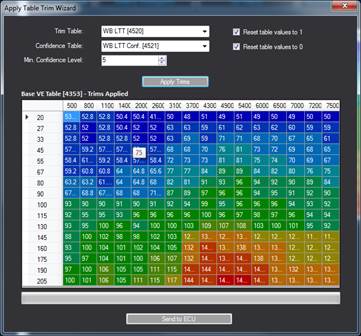
Fig 4: Trims applied to the VE table, but not yet stored in the ECU.
● The VE table has now been modified by the fuel trims (Fig. 5, below), and the Lambda LTT Trim Table (as well as its confidence table) have been set back to their default values. You can now either turn 'LTT Enable' off in the lambda driver, or do some more driving to fine tune even more.

Fig 5: Trims applied and sent to the ECU.