Managing Logs
You can manage the logging from the logging menu.
Be sure to set your real-time clock first so logs are correctly time-stamped.
The configuration allows you to select the channels you wish to log (using the tick boxes on the right), and also the frequency in Hz.
The Set/Get Config. options are removed in newer firmware, as the system will automatically store any configuration changes you make.
The "Switch Active State" option allows you choose whether to log on a High or a Low reading from a Digital Input assigned to "Logging Enable". This is useful if you want a simple toggle switch on the dash to start/stop logging.
You can also manual start and stop logging using the buttons in the logging dialogue. Note if you start logging, even after cycling power, the ECU will resume logging (under a new file) once the ECU power is resumed.

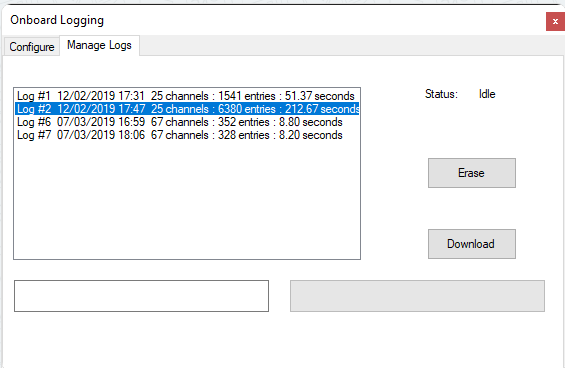
You can view the logs from the "Manage Logs" tab. All logs in memory are shown, along with the date/time and length. You can select files to Erase, or download. Pressing 'Download' will show a progress bar and will save the file to your PC in a place of your choosing. The data-log will still be left on in memory if you wish to download it again later.
You can also format the SD Card from this menu. It may take several minutes depending on the size of the card, and should only be carried out with ignition on and the engine off. Please wait until the status notifies you of completion before turning off power.