Status Bar
The status bar at the bottom of MEITE indicates key information when connected to an ECU.

Map Selected Mode
These three boxes indicate the currently selected Injection, Ignition and Boost tables. Configured by switchable maps.
Status Lights
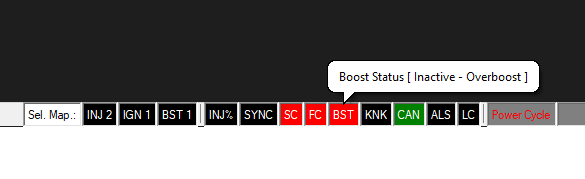
The status lights show when limiters or error-nous events have happened. You can reset a warning event by clicking them if they are flashing. If the ECU enters that warning event again, they will relight.
INJ%
Shows if the Injectors have tripped their maximum duty levels. If this is repeatedly happening and you are not achieving the AFR you would like, then you need to either increase fuel pressure or injector size.
SYNC
Shows the current sync status, and also, will warn if you have loss of sync (i.e trigger noise).
SC/FC
Spark Cut and Fuel Cut limiters are active if these are lit. Hovering the mouse shows the cut percent.
BST
This shows if the current manifold pressure has gone beyond the abs. maximum boost set in boost settings, and the ECU is then limiting. You can see that both Spark Cut and Fuel Cut is taking place at this point. Hovering the mouse states the reason (which is also shown on the boost status DRO. You can also see CAN Status is active (transmitting) in green.
KNK
This shows if Knock is being triggered in accordance with the Knock Settings.
CAN
Shows if Canbus is active (Green), off (Black) or in fault state (Red).
ALS/LC
Shows the status of launch control and Anti-Lag systems.
Power Cycle
If this is lit, it because you have changed a critical setting (such as engine trigger type) and therefore need to completely power cycle the ECU for the changes to take effect.
Current Loaded Map
If you have loaded a file, the name of the file will be shown here. If you have simply connected to an ECU, then nothing will be shown.
Logging/Autotune
These show if MEITE based Logging or Auto-Tune are currently active.
Data
These arrows flash to show comms are happening with the connected engine management system.
Connection State and Firmware
If you are not connected, or comms have dropped, this will show red or yellow. Clicking it will force a connection attempt. Once connected, it will be green, with the currently connected ECUs Firmware version being display.
Comm Port
The currently chosen comm port is shown here. You can also choose which port to use here.