Trigger Logger
The MEITE features a powerful inbuilt trigger scope for analysing waveforms seen by the ECUs Precision Timing Module. These are used to trace faults with crank/cam sensor or for working out which pattern is suited to your engine for correct engine position decoding.
When connected to an ECU, go to ECU>Trigger Logger under the menus to bring up a new trigger scope window on the current tab.
When ready, press START, and crank the engine (you can also just press start when the engine is running) and you will see the scope windows begin to fill with data. When you have a few seconds worth, press STOP.
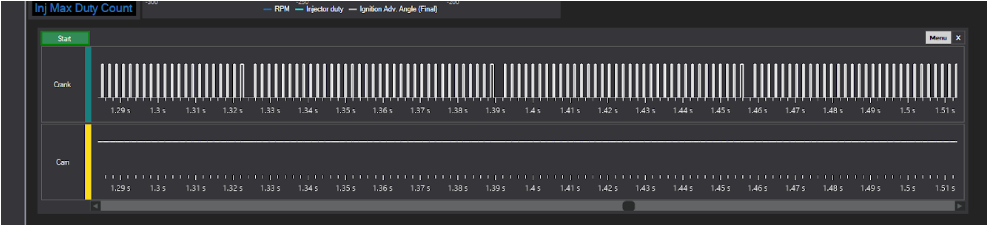
You can see above the 36-1 pattern that is currently being fed into the ECU, as well as the fact there are no Camshaft sensor pulses arriving.
You can do several operations on the data:
- Use the mouse-wheel or +/- keys to zoom in and out.
- Moving the mouse cursor over the lines will show you the tooth times in milliseconds (fig 6.2)
- You can also select a block of events by RIGHT clicking in two places of the data. The amount of rising/falling edges as well as total time elapsed is then shown.

You can also then use the MENU button in the top right of the trigger scope to save the file, which will be a typical request from us for support when diagnosing trigger issues or adding new trigger methods.